

Invoices tell your customer what they owe. They should also make it obvious how to pay it.
Until now, that last part was something FiscalRail clients had to manage outside the invoice: add bank details manually, keep them in a template, or build them into their own PDF workflow. That is now built in.
FiscalRail now supports reusable payment instructions.
The first supported instruction type is a bank transfer. You configure a beneficiary, IBAN, and optionally a BIC once, then use that instruction whenever you issue an invoice.
This is deliberately not a payments product. FiscalRail does not move money or attempt to reconcile your bank account. It makes the payment details on an invoice correct, consistent, and durable.
Set it once, use it by default
Most businesses have one primary account where they want customers to pay. You can create a bank-transfer instruction and add it to your account's default payment instructions.
From then on, ordinary invoices with a positive amount automatically include those payment details unless you explicitly select different ones for that invoice.
You can also keep several instructions, in a defined order. This is useful when, for example, you accept payments to different accounts or need to give a customer a specific payment route.
The first instruction is the preferred one. All selected instructions remain available on the invoice.
Payment details are part of the invoice
Payment instructions are account configuration, so you can update them as your bank details change. But an issued invoice is immutable.
When FiscalRail issues an invoice, it resolves the selected payment instructions and copies the beneficiary, IBAN, BIC, and invoice-number reference onto the immutable invoice record. The same details are used when rendering its PDF.
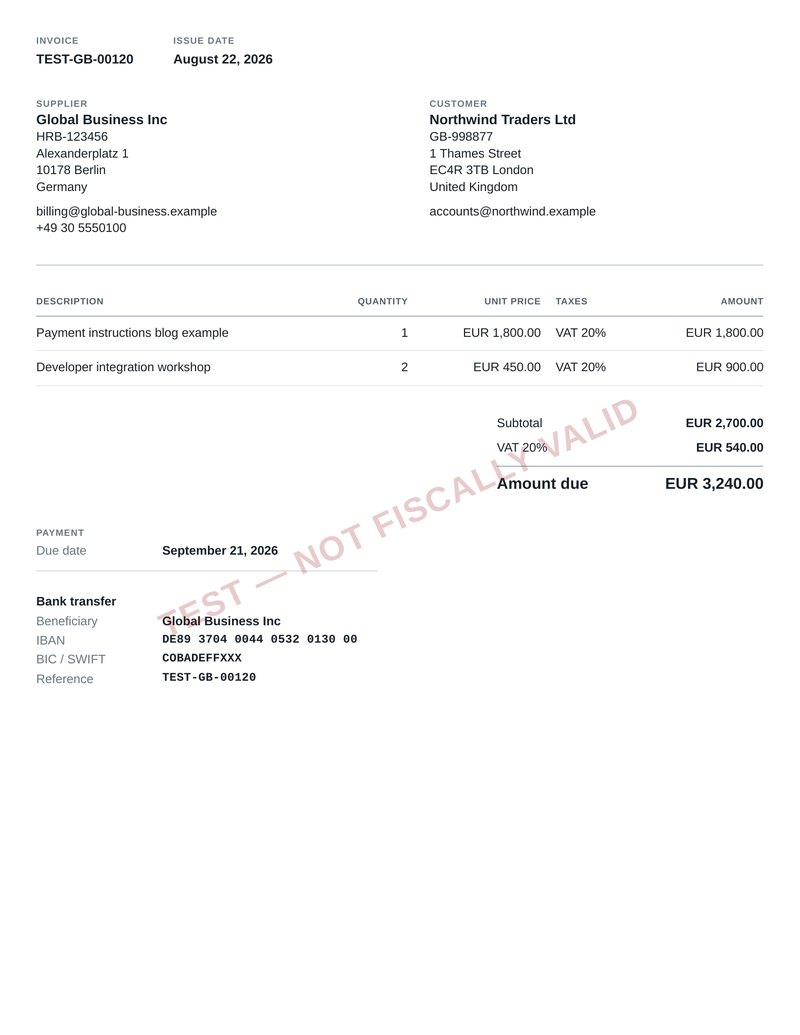
An invoice should remain a reliable record of what you actually sent to a customer. Updating your bank account next month should not silently alter an invoice you issued last month.
Keep the API explicit when it needs to be
Defaults are convenient, but they are not compulsory.
When issuing an invoice, you can select payment instructions explicitly through the payment_terms.options field. That lets an integration choose the right account for a particular customer or workflow without changing the account-wide default.
FiscalRail validates IBANs when payment instructions are created. It normalizes them to uppercase without whitespace, checks the registered country length, and verifies their check digits.
Payment instructions are not applied to credit notes, zero-value invoices, or invoices with a negative payable amount. Those documents should not ask a customer to make a payment.
Get started
Create a bank-transfer payment instruction through the dashboard or API, add it to your account defaults, and it will be included on eligible invoices going forward.
Read the Payment instructions documentation for the full API reference.
This article, like all FiscalRail documentation, is not tax advice. Consult your tax professional.